Vibe Coding - 疑难杂症部分
疑难杂症
通用
乱码解决办法
7 在 Documents\PowerShell 旧版在 Documents\WindowsPowerShell
修改Microsoft.PowerShell_profile.ps1
# PowerShell UTF-8 编码配置 - 极简版
[Console]::OutputEncoding = [System.Text.Encoding]::UTF8
[Console]::InputEncoding = [System.Text.Encoding]::UTF8
chcp 65001 | Out-Null
Claude Code for VS Code
1. 侧边栏不显示
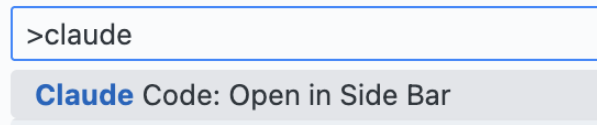
摁住cmd+shift+p 输入claude搜索,选择 open in side bar
无法使用第三方API
编辑(或者新增)~/.claude/config.json
{
  "primaryApiKey": "default"
}
修改配置后重启!!!
Codex
1. 登录问题:以一种访问权限不允许的方式做了一个访问套接字的尝试。 (os error 10013)
1.使用管理员启动CMD 2.依次运行 netsh int ipv4 set dynamicport tcp start=49152 num=16384netsh int ipv6 set dynamicport tcp start=49152 num=16384 3.重启电脑
2. 更新插件后导致历史的会话“丢失”
安装回原版本或临近的版本,历史会话记录就会找到,但是新的插件版本中的会话同样会丢失
VS Code 的插件镜像网站: https://vsc-extension.dreamsoul.cn/
3. 不能直接选择思考级别
在 config.toml 配置中添加 requires_openai_auth = true
4. 模型 gpt-5-codex 文件编辑的方式 bug
在 config.toml 配置中添加 requires_openai_auth = true
5. CLI 切换模型相关问题
通过启动参数指定模型进入交互模式:
codex -m gpt-5-codex6. Codex模型写脚本改代码?
原因:
猜测是codex模型就是基于gpt5模型的coding数据sft出来的模型,所以openai很自信的认为已经不需要提示它使用apply_patch了,但结果很明显,codex模型根本不知道还有一个apply_patch工具被hook在了shell工具之中,导致tool定义里没有apply_patch的时候,是完全不知道可以使用apply_patch的。
补上提示词:
# Text Editing Tools

When performing text editing, must use the `apply_patch` tool instead of running temporary scripts with Python commands to edit files (e.g `{"command":["apply_patch","*** Begin Patch\n*** Add File: test.txt\n+test\n*** End Patch\n"],"workdir":"<workdir>","justification":"Create file test.txt"}`)
只需要添加上apply_patch的调用例子,并且强调应该使用apply_patch进行文件修改,应该就和gpt5模型行为对齐了。